
iStorage Server Online Help

| Storage Sharing and Read-Only Access | KernSafe iSCSI SAN User Manual |
KernSafe iSCSI SAN can publish one hard disk, partition, image file, or security image to multiple clients. This is convenient for centralized management because the data is maintained in one place and updates are applied only once. At the same time, unrestricted multi-client write access to a single storage device or LUN can introduce data corruption risks. Common causes include:
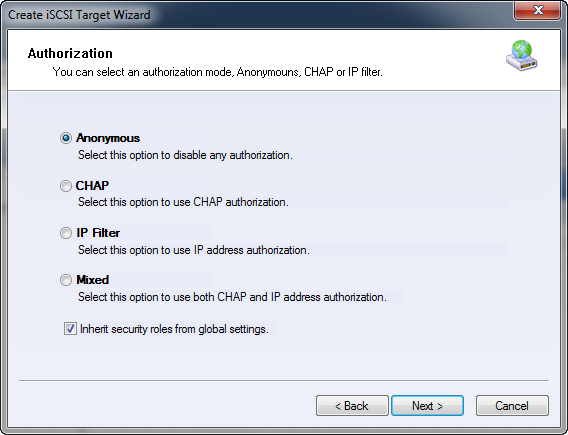
To reduce these risks, KernSafe iSCSI SAN supports separate access permissions. Some initiators can be granted read-only access while others receive full read/write access. This protects shared data from accidental changes and, in normal non-clustered scenarios, KernSafe iSCSI SAN typically allows only one full-access writer at a time. When you create a target, access can be controlled by Anonymous, CHAP, IP Filter, or Mixed authorization, as shown in Figure 1.
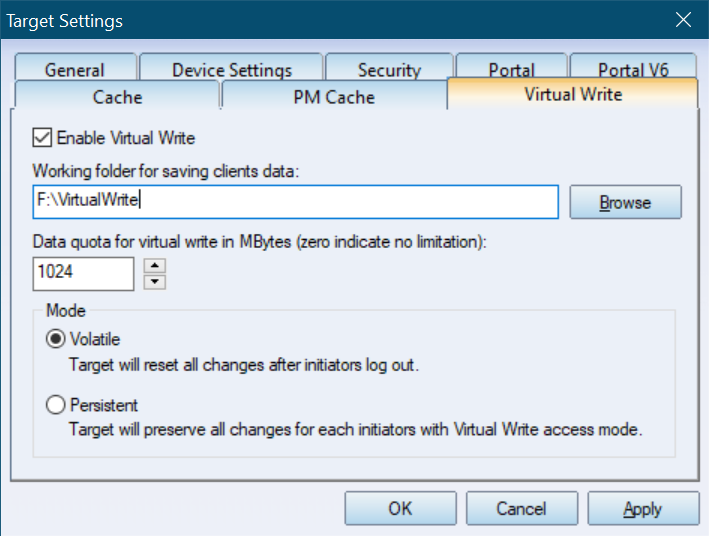
Virtual Write
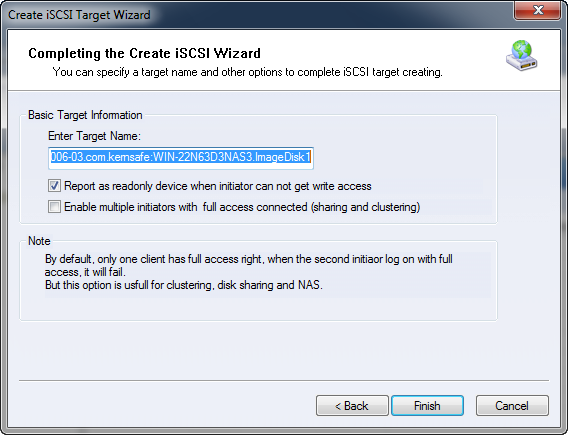
Note: When using Virtual Write, do not enable Report as read only device when initiator cannot get write access during target creation, as shown in Figure 3.
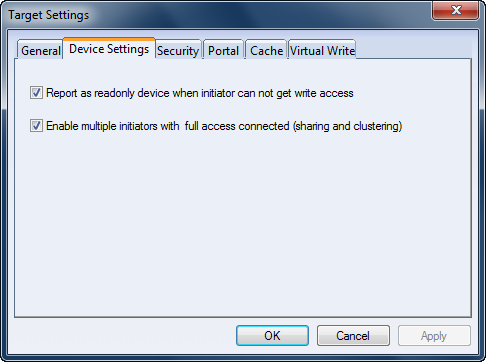
Concurrent multi-user writes can still be required in clustered environments. In that case, the cluster software is responsible for coordinating write access and maintaining consistency. For cluster scenarios, enable Enable multiple initiators with full access connected (sharing and clustering) on the last page of the Create Target Wizard, as shown in Figure 4.
|
|

SUPPORT
- Forum
- Support Ticket
- [email protected]

- Voice Mail:
- +1 (518) 289-4888