
K-Backup Suite Online Help

| Register/Change License | iK-Backup User Manual |
|
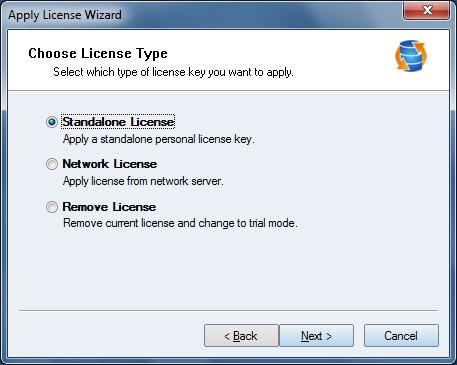
K-Backup is released as a shareware, There is only 20 days trial when you are unregistered user. If you want to use it after 20 days, Please Join the family of registered K-Backup by registering your copy. Before registration, you need to get some information about license, visit License . To register Personal version: Click Start-> Programs-> KernSafe-> K-Backup-> K-Backup, to start up K-Backup. Click Help-> Apply License to open the Apply License Wizard shown as follows:
Select Standalone License to apply a personal license.
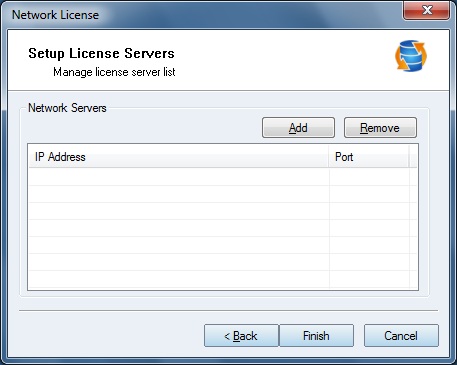
Enter the User Name, Company and License code to completing the license applying. To register Standard/Enterprise version: Select Network License to apply license from your registered K-Backup Server.
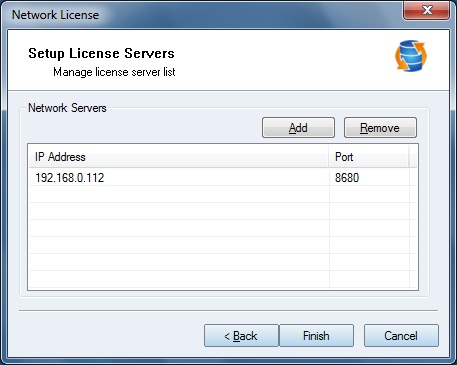
Press Add to add a K-Backup Server.
Then press Finish to activate your K-Backup. Select Remove License to remove current license and change to trial mode. To get more information about purchasing, please send an Email to [email protected]
| |


SUPPORT
- Forum
- Support Ticket
- [email protected]

- Voice Mail:
- +1 (518) 289-4888