SuperSAN X Online Help
Install and Uninstall Storage Center KernSafe Storage Center

KernSafe Storage Center can be easily installed by following the instructions introduced in this section.

If a previous version of the Storage Center has been installed, please close all the Storage Center applications.

Step 1: Download and Decompress
Download KernSafe Storage Center from the KernSafe website and decompress it with: tar -zxvf storage-center.5.50.tar.gz. Note that the version number changes with each release; update the command to match your downloaded filename.

KernSafe iSCSI SAN server - Linux installation step 1

Step 2: Install
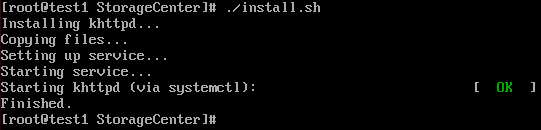
Enter the package folder and run: ./install.sh. If you are not running as root, use: sudo ./install.sh. Press Enter to continue.

KernSafe iSCSI SAN server - Linux installation step 2

Now the Storage Center for Linux has been installed on your Linux machine.

Uninstallation
Enter the package folder and type the command: ./uninstall.sh, if you are not running in root user, type the command: sudo ./uninstall.sh. Press the Enter key to continue.

KernSafe iSCSI SAN server - Linux installation step 3

SUPPORT

Newsletter

  • NAME
  • EMAIL