
iStorage Server Online Help

| Asynchronous Replication Application | KernSafe iSCSI SAN User Manual |
|
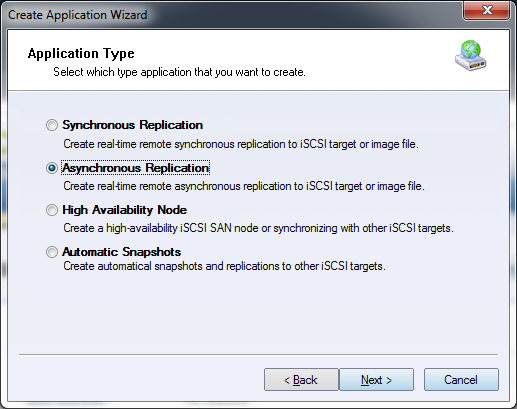
Asynchronous replication is used to maintain a secondary copy of a target for backup or disaster-recovery purposes. Because replication occurs asynchronously, the primary target can continue serving I/O while data is copied to the destination in the background. Step 1. Right-click the Applications node in the left tree of the main window, then choose Create Application.
Select Asynchronous Replication as the application type. Click Next to continue. Step 2. Select the replication destination.
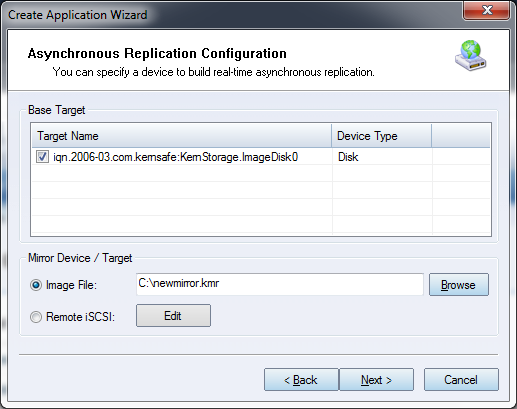
First, choose the source target that will act as the base target. Image File: Replicate to an image file path. Remote iSCSI: Replicate to a remote iSCSI target. If you choose Remote iSCSI, click Edit to configure the remote target.
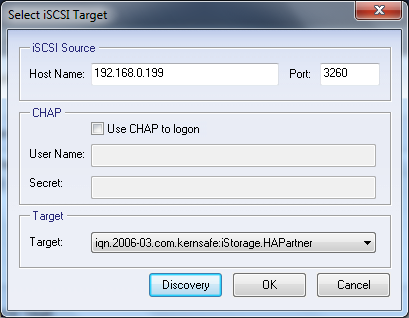
Enter the host name and port of the remote iSCSI server, then click Discovery to retrieve the available targets. Select the required target and click OK. If the selected target requires CHAP authentication, provide the user name and secret to log on. Click Next to continue. Step 3. Configure synchronization.
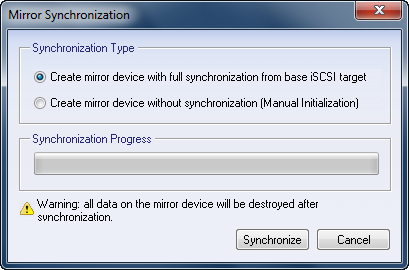
If you want the replica to be fully synchronized from the base iSCSI target, choose Create mirror device with full synchronization from base iSCSI target. Otherwise, choose Create mirror device without synchronization. Note: All data on the replica target is destroyed during full synchronization. Step 4. Complete application creation.
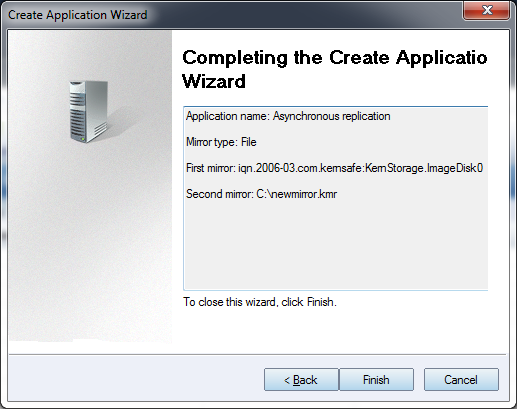
Review the settings. If changes are required, click Back; otherwise, click Finish to create the asynchronous replication application. |
|

SUPPORT
- Forum
- Support Ticket
- [email protected]

- Voice Mail:
- +1 (518) 289-4888