
iStorage Server Online Help

| About
Create CDP Device |
KernSafe iSCSI SAN User Manual |
|
A CDP device provides continuous data protection. It allows you to restore data to a specific point in time because changes are backed up continuously. This reduces the risk of data loss caused by corruption, deletion, or other unexpected events. Creating a CDP Device Follow the steps below to create a CDP device. Step 1. Select Service -> Create Target from the Storage pop-up menu in the main interface of KernSafe iSCSI SAN.
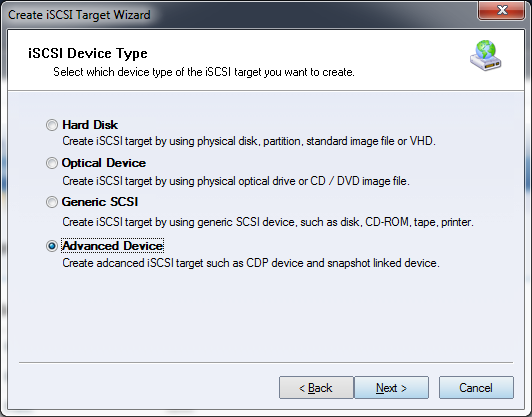
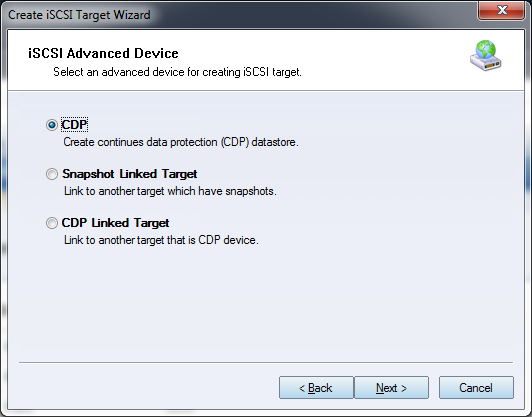
Choose Advanced Device in the Device Type group. Press the Next button to continue. Step 2. Select the CDP device in the iSCSI Advanced Device window.
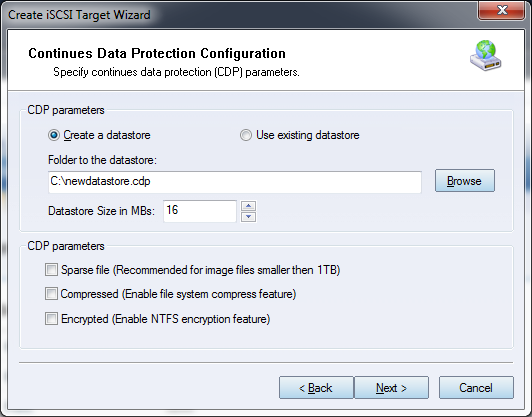
Press the Next button to continue. Step 3. Configure the CDP parameters.
Select the folder where the CDP datastore will be stored, then specify its size. Additional parameters include:
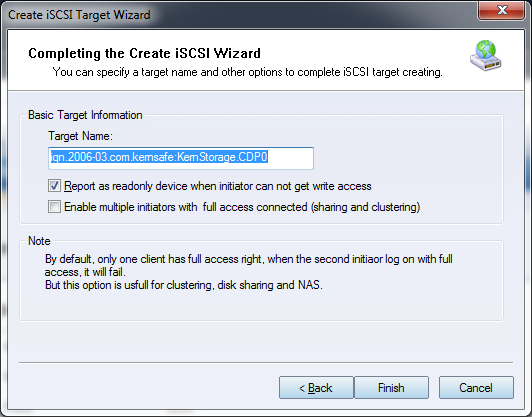
Press the Next button to continue. Step 4. Enter the target name.
Press the Finish button to complete creation of the CDP device. |
|

SUPPORT
- Forum
- Support Ticket
- [email protected]

- Voice Mail:
- +1 (518) 289-4888