
iStorage Server Online Help

| About Creating a Generic SCSI Device | KernSafe iSCSI SAN User Manual |
|
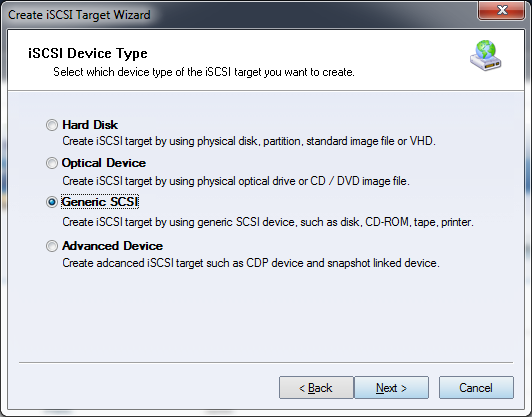
A Generic SCSI device can be any SCSI-accessible device attached to the server, including physical disks, optical devices, USB storage, scanners, tape drives, and similar hardware. KernSafe iSCSI SAN exports the selected device as an iSCSI target so that client machines can use it across the network without physically moving the device. SCSI commands issued by the initiator are forwarded to the local device, so it behaves as if it were attached directly to the client. Creating a Generic SCSI Device Follow the steps below to create a Generic SCSI target. Step 1. Select Service->Create Target from the main interface of KernSafe iSCSI SAN.
Choose Generic SCSI in the Device Type group. Press Next to continue. Step 2. Select the physical SCSI device.
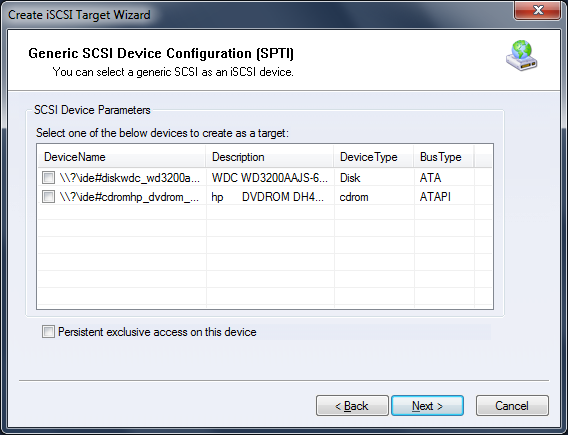
Select the local device that you want to expose as an iSCSI target. Press Next to continue. Step 3. Set the authorization mode.
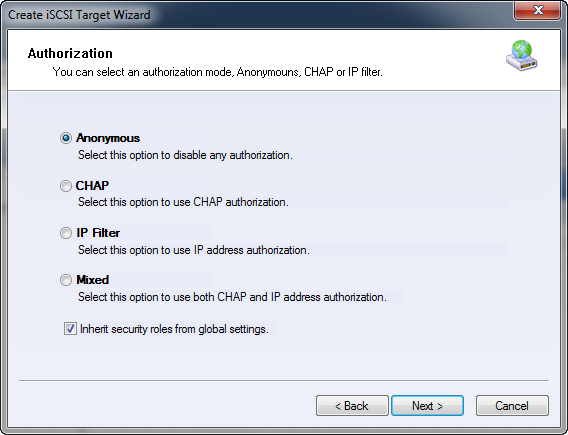
Select an authorization mode. If you need more background, see Authorization Mechanism. Press Next to continue. Step 4. Enter the target name.
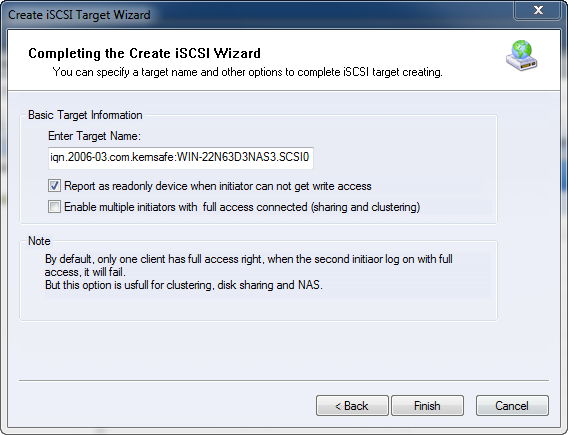
Press Finish to complete target creation. Note: Some SCSI devices enforce transfer-size limits. If needed, adjust the Microsoft iSCSI Initiator registry settings below to 65536. Registry key: HKEY_LOCAL_MACHINE\SYSTEM\CurrentControlSet\Control\Class\{4D36E97B-E325-11CE-BFC1-08002BE10318}\0000\Parameters
The sub-key 0000 may instead be 0001, 0002, and so on. Check the DriverDesc value and make sure that it corresponds to Microsoft iSCSI Initiator. | |

SUPPORT
- Forum
- Support Ticket
- [email protected]

- Voice Mail:
- +1 (518) 289-4888