
iStorage Server Online Help

| About
Create Snapshot Linked Target Device |
KernSafe iSCSI SAN User Manual |
|
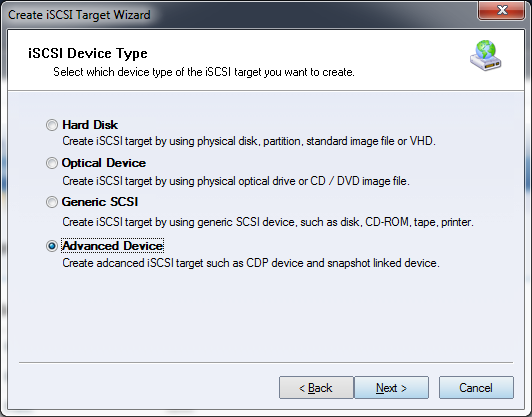
A Snapshot Linked Target device creates a new target based on an existing snapshot. This lets you expose a recovery point quickly without creating a full duplicate of the original target. Creating a Snapshot Linked Target Device Follow the steps below to create a snapshot linked target device. Step 1. Select Service-> Create Target from the Storage pop-up menu in the main interface of KernSafe iSCSI SAN.
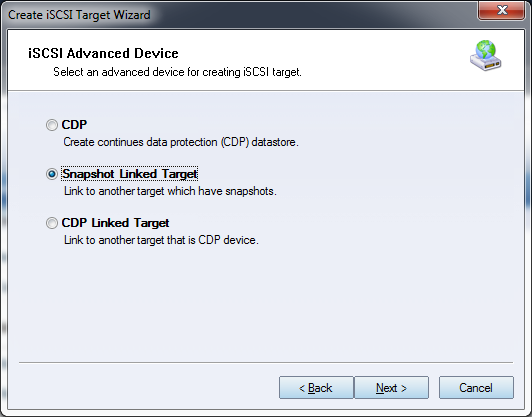
Choose Advanced Device in the Device Type group. Press the Next button to continue. Step 2. Select the Snapshot Linked Target device in the iSCSI Advanced Device window.
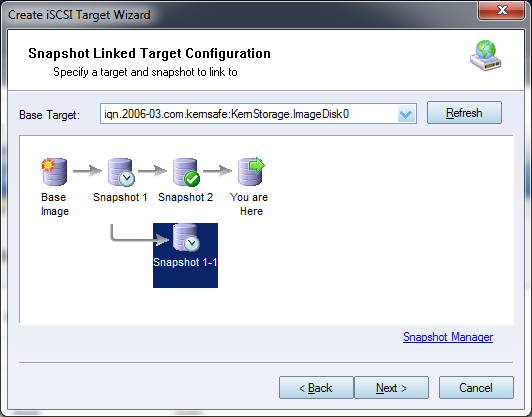
Press the Next button to continue. Step 3. Configure the snapshot linked target.
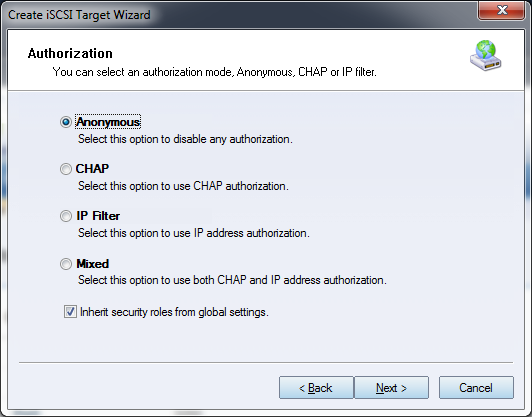
Select the base target from the drop-down list. Then select the snapshot to which the new target should be linked. Click Next to continue. Step 4. Set the authorization mode.
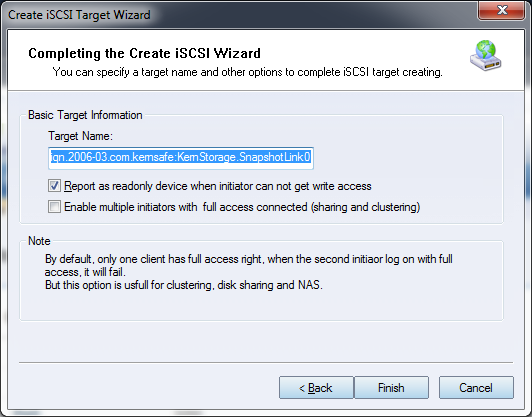
Select an authorization mode. If you need more information, see the Authorization Mechanism. Press the Next button to continue. Step 5. Enter the target name.
Press the Finish button to complete target creation.
|
|

SUPPORT
- Forum
- Support Ticket
- [email protected]

- Voice Mail:
- +1 (518) 289-4888