
iStorage Server Online Help

| About Storage Volume | KernSafe iSCSI SAN User Manual |
|
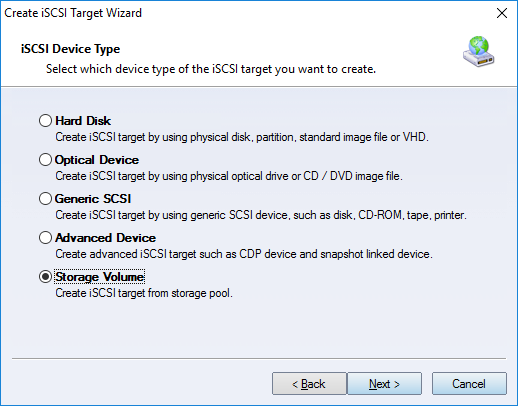
After you create a storage pool, create one or more volumes to use that capacity. While creating a volume, you can also choose whether an iSCSI target should be created at the same time. Creating Storage Volume To create the volume through the target creation workflow, right-click the Simple Target tree node and select Create Target. The Create iSCSI Target Wizard appears.
Choose Storage Volume in the Device Type group. Press the Next button to continue. Specify the information required to create the volume.
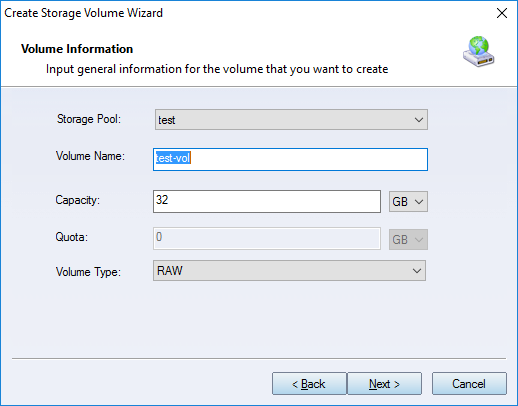
Select the Storage Pool that will host the volume. Enter the Volume Name. Specify the required Capacity. Specify the Quota. The quota is used to reserve additional space for the volume. For example, snapshots may require additional capacity, and multiple snapshots require more space. Log Structured volumes may also require approximately 20% extra space even before snapshots are created. Specify the Volume Type. The available types are RAW, Thin Provisioning, and Log Structured. RAW uses statically allocated space across multiple devices. It offers the highest performance, but does not support snapshots. Thin Provisioning allocates space dynamically as data is written. It supports unlimited zero-copy snapshots and provides the same performance after all space has been allocated. Log Structured is similar to Thin Provisioning, but all writes are sequential, which is optimized for HDD workloads. Press the Next button to continue. Set the authorization mode.
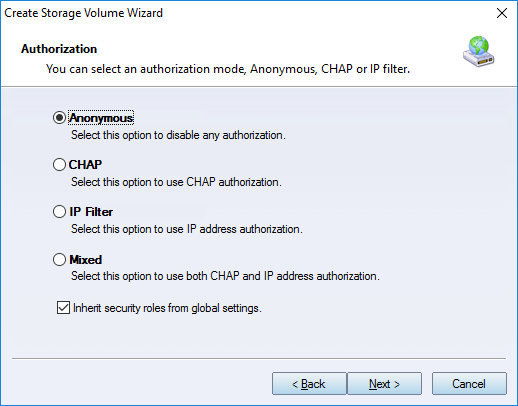
Select an authorization mode. If you need more information, see Authorization Mechanism. Press the Next button to continue. Finish creating the Storage Volume target.
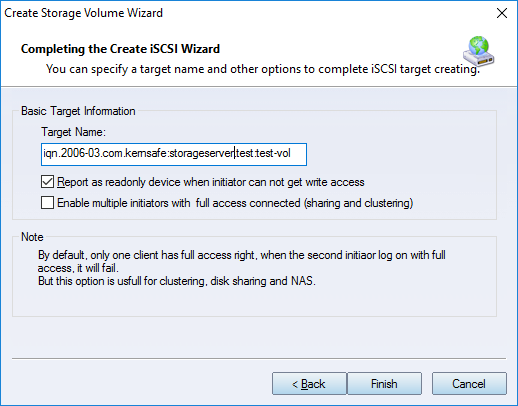
Press the Finish button to complete iSCSI target creation. | |

SUPPORT
- Forum
- Support Ticket
- [email protected]

- Voice Mail:
- +1 (518) 289-4888