
iStorage Server Online Help

| Update Data Files from Initiators to Target | KernSafe iSCSI SAN User Manual |
|
At any given time, only one client should update the contents of an iSCSI disk. Simultaneous writes from multiple initiators are not supported by standard Windows file systems and can cause file-system corruption. Why can't two or more initiators write to the same remote disk at the same time? iSCSI transfers raw data blocks to and from a remote disk. From the operating system perspective, the device behaves like a locally attached hard disk. If multiple hosts write to the same block device at the same time without a cluster-aware file system, nothing prevents them from corrupting the data. Shared-write access requires operating-system coordination or a specialized shared-disk file system. When an iSCSI initiator writes data to a remote disk, the updated files might not be visible immediately on the target server because of Windows caching. To address this, KernSafe iSCSI SAN provides the Hold and Update feature, which is designed to reduce network traffic and improve performance while still allowing the target-side data to be refreshed correctly. Why are files copied by the initiator not visible immediately on the target? Because of client-side caching, data written through the initiator is not always visible immediately on the target system. The Hold and Update mechanism helps coordinate this workflow. To use the Hold and Update mechanism, the server machine (the iSCSI target) should meet the following conditions:
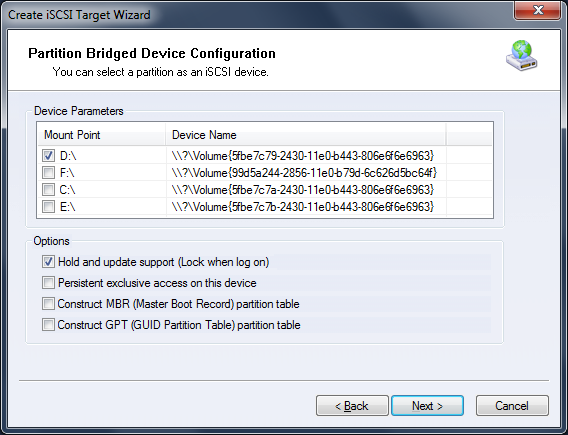
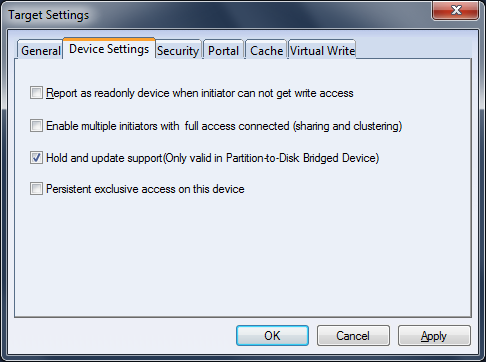
Beginning with KernSafe iSCSI SAN 1.27, the Create Target wizard and Device Settings include an option to enable Hold and Update, as shown in Figure 1 and Figure 2.
Figure 1
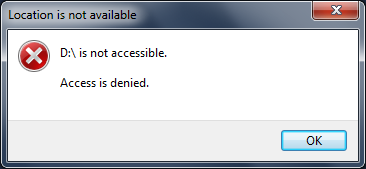
Figure 2 After a target is created with the Hold and Update support option enabled, you can log on with your CHAP user name and secret through the iSCSI Initiator and obtain Full Access. If you need more information, see KernSafe iSCSI SAN Quick Start. Once the connection is established, the volume cannot be used on the iSCSI target machine, as shown in Figure 3.
Figure 3 After you finish copying files or performing other data operations, log out of the iSCSI session. You can then open the volume on the target machine and view the data that was updated by the initiator. |
|

SUPPORT
- Forum
- Support Ticket
- [email protected]

- Voice Mail:
- +1 (518) 289-4888