

KVault Initiator |


|
|||
|
||||



Using KernSafe KVault Initiator
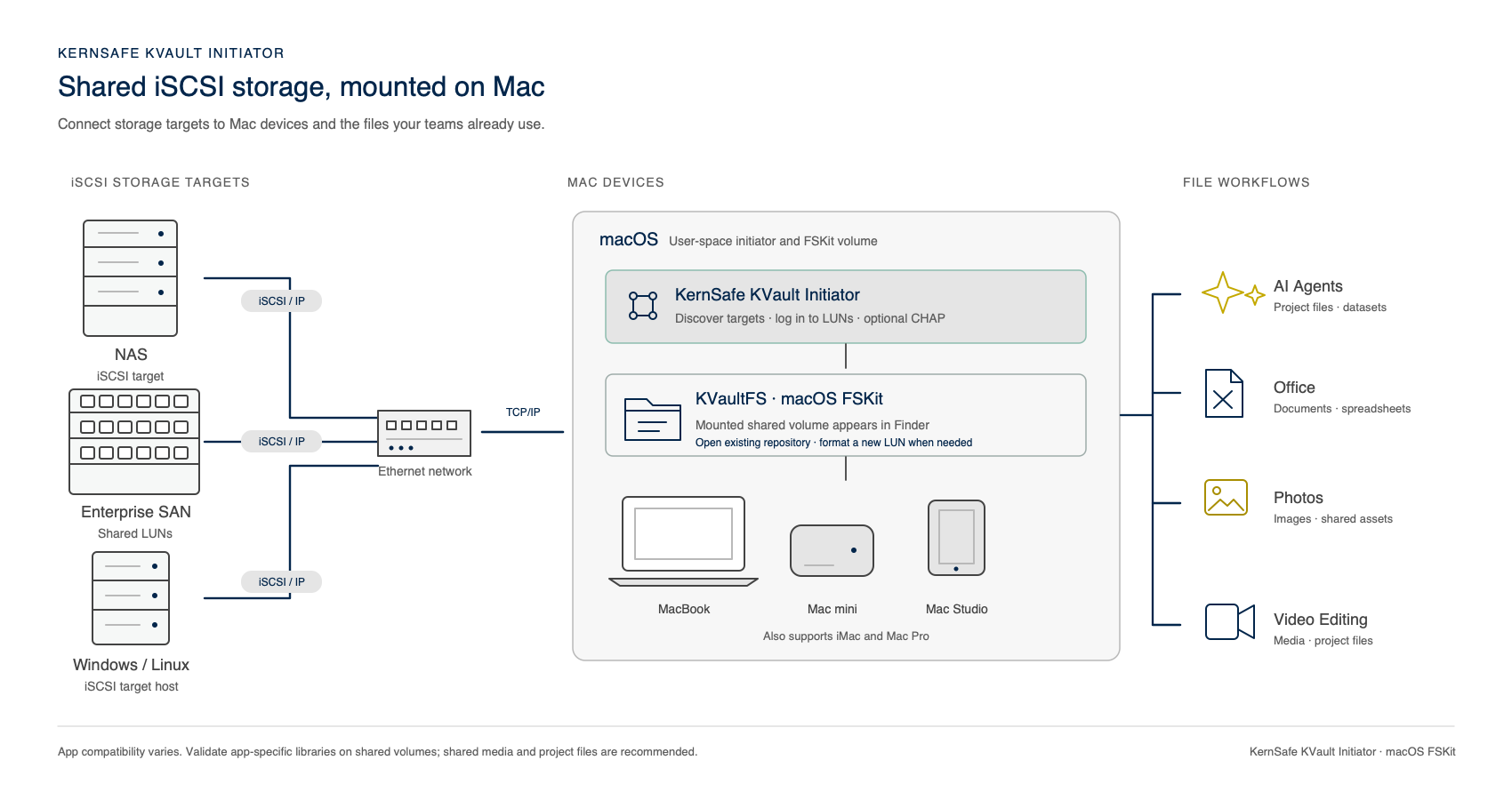
KernSafe KVault Initiator connects a Mac to an iSCSI target and mounts a KVaultFS repository as a volume in Finder. Use the same workflow with a compatible NAS, enterprise SAN, or Windows or Linux server that exposes an iSCSI target and LUN.
Connect an iSCSI Storage Source
KVault Initiator connects to block storage presented as an iSCSI target. The storage system may be a NAS or SAN appliance, or a Windows or Linux host running iSCSI target software. A network file share using SMB or NFS is not itself an iSCSI target; configure the storage system to expose an iSCSI LUN before connecting.
You will need the target portal address, port, target IQN, and LUN number. The standard iSCSI port is 3260 unless your storage administrator specifies another port. The Mac must have network connectivity to the target.
Discover, Connect, and Mount
- Enable the file system extension. Install KVault Initiator on a supported Mac running macOS 26 or later. In System Settings, enable KernSafe KVault Initiator under General > Login Items & Extensions > File System Extensions.
- Add a discovery portal. In the initiator console, add the target server address and port. Refresh the portal to discover available targets, then select the target IQN.
- Configure the target login. Choose a display name, initiator name, and LUN. Enter CHAP credentials if required by the target. You can also choose read-only access and set a reconnect window.
- Open or create the repository. Log on and open an existing KVaultFS repository without formatting it. Format a LUN only when it is intended to become a new repository and its current contents may be erased.
- Use the mounted volume. Once mounted, the repository appears in Finder. Open, save, and organize files using Finder or compatible Mac applications. Log out from the selected target when you are finished to unmount the volume and close the iSCSI session.
Initiator Features
- User-space iSCSI. Connect to iSCSI targets without installing a legacy kernel storage extension.
- Target discovery and session management. Save discovery portals, refresh target lists, and manage Favorites, Connected, and Failed views from one console.
- KVaultFS through macOS FSKit. Mount a KVaultFS repository as a Finder-accessible volume.
- Existing and new repositories. Open an existing repository or explicitly format an eligible LUN to create a new one.
- Optional CHAP authentication. Configure target credentials for login. CHAP secrets are stored in the macOS Keychain rather than in portal or target settings.
- Read-only and reconnect controls. Mount a repository read-only for inspection, and configure the reconnect window for a target session.
Use Private File System Storage in Your Mac Workflows
KVault Initiator provides mounted storage; it does not replace the applications that use the files. Applications access files through the mounted KVaultFS volume, subject to their own file-system and workflow requirements.
- AI agents and datasets. Keep project files, reference documents, and datasets on the mounted volume for compatible local AI tools and agent workflows.
- Office documents. Browse and work with compatible documents, spreadsheets, and presentations from Finder and supported office applications.
- Photos and image assets. Store and organize image files, exports, and project assets. Verify an application's requirements before placing its managed photo library on a network-backed volume.
- Video editing. Keep source media and project files on shared storage when the editing application and network performance meet the workflow's requirements. Local render and cache locations may be preferable for performance.
Important Usage Notes
- Formatting a LUN overwrites its existing contents. Confirm the selected target and LUN before enabling the format option.
- Do not mount the same KVaultFS LUN read-write on multiple Macs at the same time unless the file system and application workflow explicitly support coordinated multi-host access. KVault Initiator does not provide cluster locking.
- Application-managed libraries, including photo and video libraries, may have requirements beyond ordinary file access. Test the complete workflow before moving a production library to shared storage.
- Do not enable another file system extension that attempts to mount the same LUN.

SUPPORT
- Forum
- Support Ticket
- [email protected]

- Voice Mail:
- +1 (518) 289-4888