

SuperSAN X |


|
|||
|
||||




SuperSAN X, the iSCSI SAN solution for macOS, is a macOS port of the Windows-based iStorage Server. It is fully compatible with Windows iSCSI SAN environments and supports nearly all enterprise features available in iStorage Server. Users can refer to the complete collection of white papers and technical documentation here:
http://www.kernsafe.com/white-papers.aspx
Deploying SuperSAN X is simple. Users only need a macOS system to run the SuperSAN X core services, while administration can be performed remotely from a Windows desktop using the KernSafe management console or through the built-in web management platform.
1. Installing SuperSAN X
Download SuperSAN X from the KernSafe website, then open the SuperSAN.dmg package. macOS will automatically mount it as a virtual disk.
Double-click the SuperSAN icon to launch the installer.
Follow the setup wizard to complete the installation.
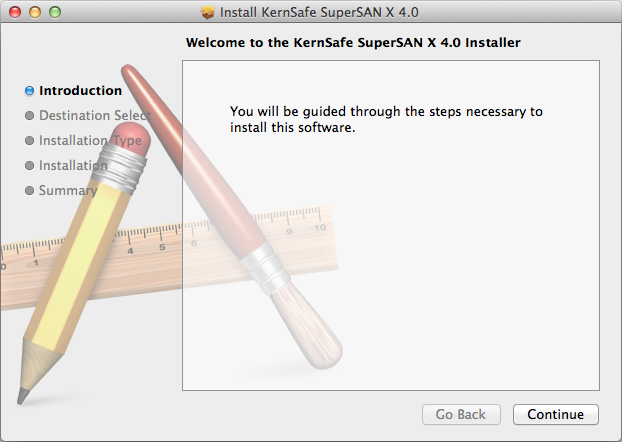
Step 1.
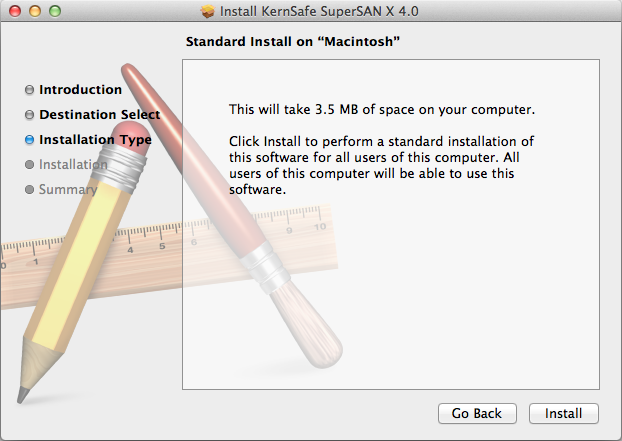
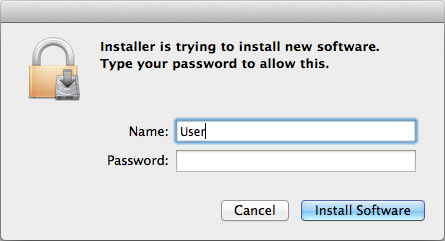
Step 2. Continue the installation and enter system credentials.
Step 3. Finish the installation.
After installation is complete, SuperSAN X services will automatically start with macOS.
2. Windows Remote Management
On Windows, launch the KernSafe iSCSI SAN Management Console and select:
Server -> Add Another Server...
In the popup window, enter the IP address of the macOS server and click the OK button.
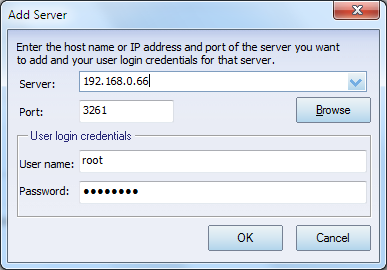
After adding the server, users can fully manage the SuperSAN X environment by following the white papers or user manuals.
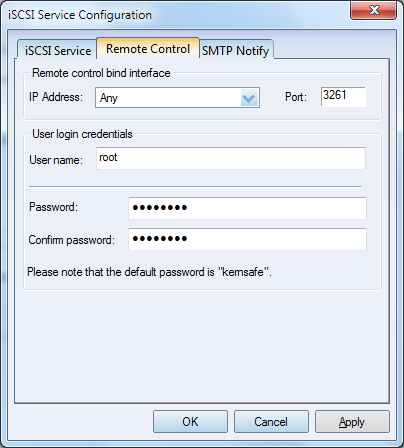
For security purposes, we strongly recommend changing the default management password after installation. Click the Settings button to modify the management password in the following window:
3. Web Management
After installing SuperSAN X, the built-in web management platform, Storage Center, will also be installed automatically.
Open any web browser and navigate to:
http://localhost:3262/
Default login credentials:
Username: root
Password: kernsafe
Users can then manage the iSCSI SAN environment directly through the web browser by following the online documentation and user guide.

SUPPORT
- Forum
- Support Ticket
- [email protected]

- Voice Mail:
- +1 (518) 289-4888